Confirm minutes and business arising
Overview
Most meetings begin by confirming the minutes of the previous meeting and reviewing outstanding items. Process PA keeps the continuity between meetings clear, while leaving you in control of exactly what carries forward.
Confirm the previous minutes
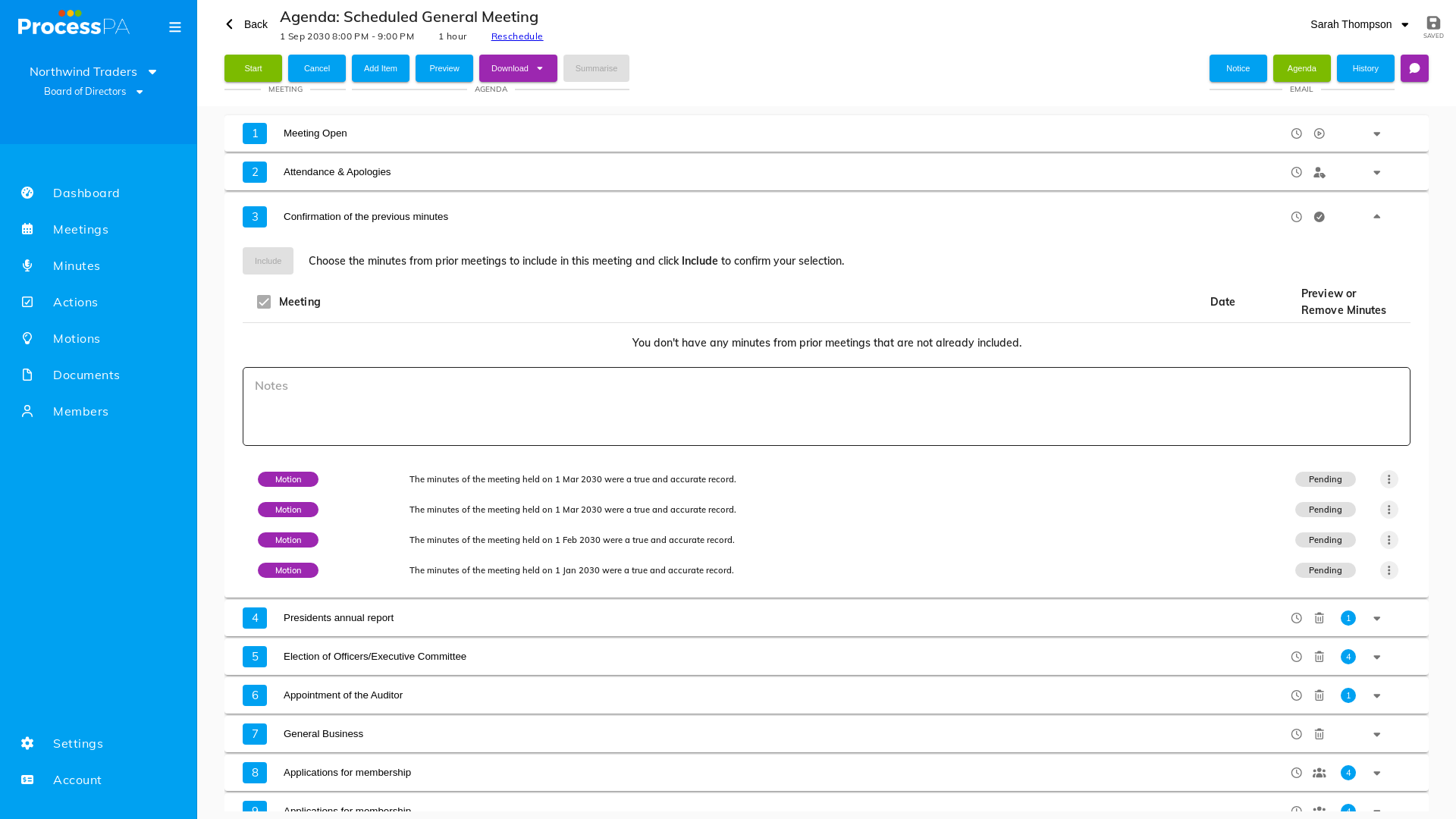
You don’t have to schedule the next meeting to finalize the current one — that requirement was removed. Instead, when you prepare the next meeting, you choose which previous minutes to include:
- While preparing the next meeting, select from your unconfirmed minutes the ones to include on the agenda. This prepares a Confirm Minutes motion and links the previous minutes directly to the agenda.
- At the meeting, open the confirm-minutes agenda item.
- Record that the minutes were confirmed.
Business arising (Carry Forward)
Outstanding action items and motions from prior meetings are surfaced automatically as business arising — a yellow exclamation mark (!) flags when there’s something to carry forward, so nothing is overlooked.
- When preparing the agenda, review the outstanding items and choose which to carry forward onto this meeting. You decide what’s still relevant rather than having everything copied across.
- During the meeting, update, complete or add notes to each carried-forward item.
Carried-over actions and motions keep their original numbers, so they’re easy to track from one meeting to the next.
Related
Video
Page Details
Updated on July 17th, 2026